Using your hearing aids with other devices

Hearing aids can connect with many devices to help you hear more clearly and comfortably. Whether you want to enjoy television, use your mobile phone, or listen to music.
This page explains the most common connection options and how to use them.
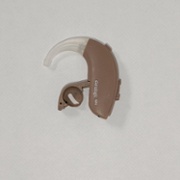 Picture of an Ambio hearing aid.
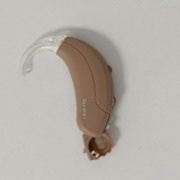 An Es-fit series hearing aid
Ambio hearing aids can be used with GN accessories as well the telecoil loops and direct audio input accessories described in the next section. Danalogic GN offer a range of wireless accessories to enhance your listening experience by streaming sound directly to your hearing aid(s), minimising unwanted background noise. Danalogic wireless accessories can be purchased from the Danalogic website. Follow this link to visit the Danalogic website for information on hearing aid accessories. Please enter the code PU00246 if you are a Swansea Bay NHS hearing aid user and are purchasing any devices.
Danalogic Technical Support for product help and enquiries:
Call: 01869 352800
Email: ehs@gnresound.com.
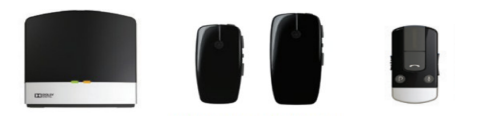
Available devices include:
Ambio Smart hearing aids have Bluetooth streaming capability which allows you to hear sounds from your phone or tablet (calls, music and audio) directly through your hearing aids. For more details on bluetooth streming, follow this link to the Danalogic website. If you are unsure if you have an Ambio Smart hearing aid, follow this link to visit the hearing aid finder on the Danalogic website. Alternatively, you can contact the audiology team, follow this link for the audiology team's contact details on the Swansea Bay UHB audiology home page.
Ambio & Ambio Smart hearing aids can connect to the BeMore hearing aid app for Android and Apple devices which allows you to discreetly control and personalise your hearing aids. More information about hearing aid connectivity to the BeMore app can be found by following this link to the Danalogic Website.
Search for and download the BeMore app from either the App store (Apple devices) or Google Play store (Android devices). Once installed on your device the BeMore app will appear on your home screen.
Follow this link to the Apple app store to download the BeMore app.
Follow this link to the Android app store to download the BeMore app.
If your hearing aids don’t have Bluetooth
Some hearing aids such as the Danalogic E-fit series do not include built‑in Bluetooth. If your hearing aids fall into this category, you can still enjoy clearer sound from phones, tablets, TVs, and other audio devices by using Direct Input (DI) shoes and streamers/neck loops.
Access to work
Access to Work could give you a grant to help pay for things like specialist equipment and assistive software
You will need to apply for an Access to Work grant, and an application should be submitted at the earliest possible opportunity.
When you apply, you will be asked what help and support you will need at work. Access to Work will also contact your employer for more information. You will then receive an assessment that matches your needs with the correct support and an appropriate budget.
Useful Links
Royal National Institute for Deaf People (RNID)
Follow this link for the RNID website.
Telephone: 0808 808 0123 (freephone)
Text message: 0780 0000 360
Email: information@rnid.org.uk
Relay UK: 18001 then 0808 808 0123
RNID has also partnered with Connevans, one of the leading suppliers of assistive devices and technology. Follow this link to shop online for equipment and useful devices.
The National Deaf Children’s Society
Follow this link to access the NDCS website.
Email: ndcs@ndcs.org.uk
Tel: 020 7490 8656
C2Hear Online
Follow this link to access C2 (hearing well together) self-help videos.
Rydym yn croesawu gohebiaeth a galwadau ffôn yn y Gymraeg neu'r Saesneg. Atebir gohebiaeth Gymraeg yn y Gymraeg, ac ni fydd hyn yn arwain at oedi. Mae’r dudalen hon ar gael yn Gymraeg drwy bwyso’r botwm ar y dde ar frig y dudalen.
We welcome correspondence and telephone calls in Welsh or English. Welsh language correspondence will be replied to in Welsh, and this will not lead to a delay. This page is available in Welsh by clicking ‘Cymraeg’ at the top right of this page.